
Contents
- 1What the WooCommerce ecosystem looks like in practice
- 2Why WooCommerce is suitable for scaling
- 3What factors have the biggest impact on scaling
- 4Where a store usually stumbles as it grows
- 5What to check before scaling
- 6REST API, webhooks, and why they matter for growth
- 7Why updating the core does not solve everything
- 8What a business should do before peak season
- 9When to bring in a WordPress and WooCommerce team
- 10Conclusion
- 11Frequently asked questions
As a business grows, a WooCommerce store rarely breaks for just one reason. Usually, the problems build up from several layers: a slow theme, too many plugins, less-than-ideal hosting, heavy integrations, large media files, caching, the database, and uneven traffic. That is why scaling in WooCommerce is not just about a more powerful server. It is about architecture, processes, and disciplined maintenance.
WooCommerce’s official position is straightforward: the platform can scale effectively for both small and very large stores. In its documentation and releases, the vendor directly addresses scenarios with large catalogs, high transaction volumes, and optimizations for large installations. But this potential does not unlock on its own. To keep a store stable under peak load, you need to manage the entire system, not just “speed up” the homepage.
Key takeaways
- Scaling WooCommerce means managing the whole ecosystem, not just the core.
- The database, heavy plugins and integrations slow a store down most often.
- Prepare for growth and peak seasons in advance.
What the WooCommerce ecosystem looks like in practice
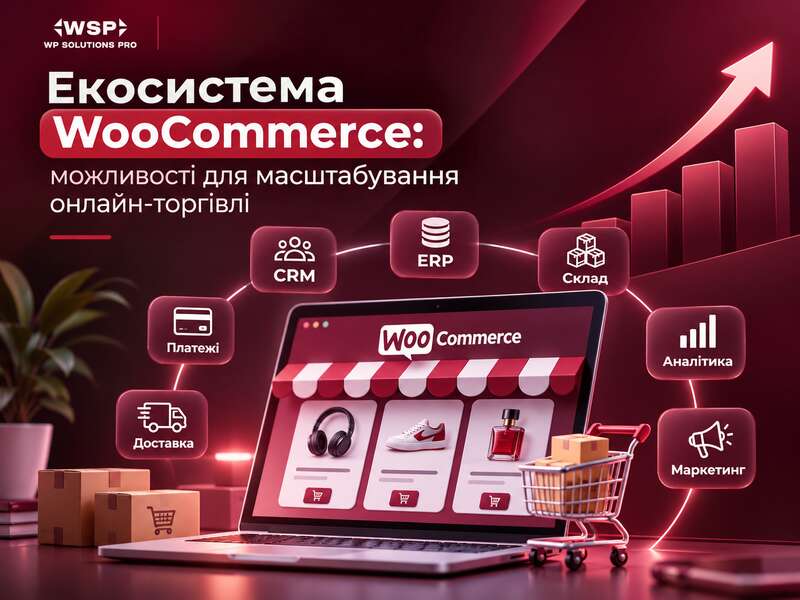
WooCommerce is not just a cart and a checkout page. In a real project, the ecosystem includes WordPress, the theme, plugins, the database, the REST API, webhooks, hosting, CDN, analytics, external services, and update processes. This combination determines whether a store can grow smoothly along with the business.
The main strength of WooCommerce lies here: its open architecture. Components can be chosen for specific tasks instead of forcing the business to fit rigid platform limits. If you need CRM integration, ERP, inventory management, email campaigns, marketing automation, or sales across multiple channels, WooCommerce lets you build that setup gradually.
But there is a downside as well. Flexibility means responsibility. If a store becomes slow or unstable, the cause cannot be found in just one place. You need to look at the whole stack: how traffic is distributed, what the core WooCommerce code is doing, how other plugins behave, and whether the infrastructure has enough resources.
Why WooCommerce is suitable for scaling
WooCommerce has long been positioned as a platform that can grow with a store. That does not mean every site will automatically handle any load. But the ecosystem has several properties that help a business scale.
- Flexible extensibility. You can add functionality through plugins, custom code, and integrations without rewriting the entire site from scratch.
- REST API. WooCommerce integrates with the WordPress REST API, making it possible to build headless or omnichannel solutions and connect the store to external systems.
- Webhooks. This is a standard mechanism for events such as order creation, product updates, or changes in shipping status.
- A mature extension ecosystem. For many business tasks, ready-made modules already exist, but they need to be selected carefully.
- Support for large installations. WooCommerce’s official materials separately mention large catalogs and optimization scenarios for large stores.
In practice, this means WooCommerce can be used not only as a starting platform, but also as the foundation for a serious eCommerce project. However, the stability of such a system depends on the quality of implementation.
What factors have the biggest impact on scaling
WooCommerce itself identifies four key groups of factors that determine store performance: traffic distribution, WooCommerce code, code from other components, and server infrastructure. This is a solid framework for any diagnosis.
1. Traffic distribution
Not all traffic is the same. If the load is spread across many pages, the site may behave differently than on a sale day, when all users open one product, one shipping option, or one checkout scenario. For WooCommerce, this is critical: a surge of traffic to a specific SKU or to checkout creates a completely different load profile than a normal catalog browse.
2. WooCommerce code
The platform regularly receives performance updates. For example, version 11.0 (August 2026) officially focused on stores with large catalogs and deep order histories: query optimizations, Store API improvements and faster product pages. That is a good sign that WooCommerce is moving toward better performance on large installations. But updating the core alone will not solve problems if the bottleneck is in the theme or third-party plugins.
3. Other plugins and the theme
This is often where the biggest delays hide. One heavy page builder, several unsynchronized marketing plugins, or a poorly implemented catalog filter can slow down the entire site. This is especially noticeable on product pages, category pages, the cart, and checkout.
4. Hosting and infrastructure
Even perfectly tuned code will not help if the server cannot handle load spikes. You need headroom in resources, correct caching settings, database configuration, PHP setup, and in many cases a CDN for static assets and media.
Where a store usually stumbles as it grows
Scaling issues rarely look like a complete outage. More often, the business sees small symptoms that gradually become systemic.
- the admin area becomes slow, especially on the orders screen;
- product pages load more slowly than before;
- cart and checkout respond with delays;
- catalog search or filters put a heavy load on the server;
- timeouts or integration failures appear during sales;
- synchronization with inventory, CRM, or ERP becomes unstable;
- conversion rates fall without an obvious business reason.
For a store owner, this is an important signal: the problem is not only in the frontend. If even the admin area is lagging, it may point to the database, complex queries, plugin conflicts, or issues in the server stack.
What to check before scaling
The best approach is not to guess, but to measure. WooCommerce recommends looking at performance through real metrics and tools rather than judging by eye.
- Collect baseline metrics. Measure product page load time, add to cart speed, checkout response time, and admin performance.
- Test the “hot” scenarios. Separately test promotions, top-selling products, the checkout page, filters, and search.
- Review the full plugin stack. Disabling one heavy component often has a bigger effect than general optimization without priorities.
- Analyze the database. Large stores accumulate lots of orders, metadata, and system records. This affects queries, indexes, and admin speed.
- Check hosting. It is important whether there is enough resource headroom and whether the site is hitting CPU, RAM, or process limits.
- Evaluate caching and CDN. For content-heavy stores, this is often a required part of the architecture, not an optional extra.
Useful tools here include Chrome DevTools, PageSpeed, New Relic, and add-to-cart event analysis. The advantage of this approach is that you can see exactly where the losses occur: on the client side, in PHP, in the database, or in an external integration.
REST API, webhooks, and why they matter for growth
WooCommerce scaling is often confused with simply increasing load. But in real business, growth almost always also means more integrations. This is where the WooCommerce ecosystem shows its strength.
The REST API makes it possible to connect CRM, ERP, delivery services, marketing platforms, and internal systems. Webhooks, in turn, automate event exchange: for example, when an order is created or a payment status changes. This reduces manual work and allows you to build more resilient processes.
But there is an important nuance: if an integration still relies on the legacy REST API, that is already technical debt. The official documentation directly states that this scenario requires a separate WooCommerce Legacy REST API plugin; otherwise, related webhooks may stop working. That is why old integrations should be checked in advance, not after something suddenly breaks in production.
Why updating the core does not solve everything
Updating WooCommerce is a mandatory part of maintenance, but it is not a magic button. Official releases do bring performance and compatibility improvements, and the latest stable version at the time of review is marked as fully secure. However, in a store that has accumulated weak spots, an update will only reduce part of the risk.
If the theme is overloaded with scripts, if there are dozens of poor-quality extensions in the catalog, or if hosting is already running at its limits, a new core version will not deliver the expected result. That is why updates need to be handled systematically: first the staging environment, then compatibility testing, then the release to production.
Before peak season
- Measure catalog and checkout speed under load.
- Update components on a staging copy, not the live store.
- Check a fresh backup and a rollback plan.
- Set up uptime and error monitoring.
What a business should do before peak season
For stores, seasonality matters a great deal. Before peak sales, it is worth doing more than just increasing the ad budget — the technical side needs to be checked as well.
- Create a staging environment. It is a safe place to test core, theme, and plugin updates.
- Introduce a release process. Changes should not reach production randomly.
- Reduce unnecessary integrations. Anything not needed for sales is better postponed or disabled.
- Test checkout under load. This is the area that most often determines conversion.
- Check caching and CDN. Especially if the store contains many images and media files.
- Audit plugins. Every additional component is another potential compatibility risk.
For large stores, this is not “preventive maintenance” but basic project hygiene. Without it, traffic growth can turn into growth in the number of problems.
When to bring in a WordPress and WooCommerce team
There comes a point when a business’s internal resources are no longer enough. This is especially noticeable if the store is growing, but the team does not have the time or expertise for systematic optimization.
Professional help is useful when you need to:
- find performance bottlenecks;
- understand why checkout or the admin area is slow;
- check plugin compatibility after updates;
- migrate or redesign integrations;
- set up staging and a safe release process;
- move the store to a more resilient architecture for high loads.
At this stage, it is important not to “treat the symptoms,” but to build a technical foundation for growth. For an agency, this is not only development, but also auditing, optimization, support, security, and risk forecasting.
Conclusion
WooCommerce is indeed suitable for scaling online commerce, but its strength lies not in a single plugin, but in the entire ecosystem. The platform provides a flexible architecture, REST API, webhooks, extensibility, and the ability to build omnichannel scenarios. At the same time, scaling requires discipline: measuring performance, controlling plugins, checking integrations, updating through staging, and keeping infrastructure under control.
If your store is already growing or preparing for a peak season, the best strategy is not to wait for the first failures. First diagnose, then optimize, then scale. That is how WooCommerce turns from a simple sales platform into a manageable foundation for business growth.
Frequently asked questions
Is WooCommerce suitable for a large store?
Yes, provided hosting, the database, caching and integrations get proper attention. Scaling WooCommerce means managing the whole ecosystem, not just the core.
Where does a store usually stumble as it grows?
Slow database queries, heavy plugins, unstable CRM or inventory integrations, and checkout under peak load.
What should be done before peak season?
Check speed and checkout in advance, update components on a staging copy, take backups and set up monitoring instead of making big changes mid-season.