
Contents
- 1What “splitting the frontend and admin” actually means
- 2When headless really makes sense
- 3When it is better not to rush
- 4REST API: what it actually gives you
- 5Can you create a new admin area through the API?
- 6Application Passwords: what they are for, and what they are not for
- 7REST API or GraphQL: how not to mix up the tools
- 8How to make the decision without illusions
- 9Frequently asked questions
The idea of a headless CMS sounds appealing: editors work in familiar WordPress, while users see a separate frontend built on a modern JavaScript stack or another technology. But for business, this is not a question of what is trendy and what is not. It is a question of the level of complexity, budget, the team, and how content actually lives inside your company.
WordPress does provide the technical foundation for this kind of separation. The REST API delivers data in JSON format, and on top of it you can build a separate frontend, autonomous applications, or even alternative ways of working with data. At the same time, WordPress documentation itself emphasizes that if a site already works well, there is no reason to force a move to the REST API just for the sake of moving to it. This is an important line that often gets lost in conversations about headless.
Key takeaways
- Headless means WordPress as the admin plus a separate front end via API.
- It pays off when content is needed on several platforms.
- For most business sites classic WordPress is simpler and cheaper.
What “splitting the frontend and admin” actually means
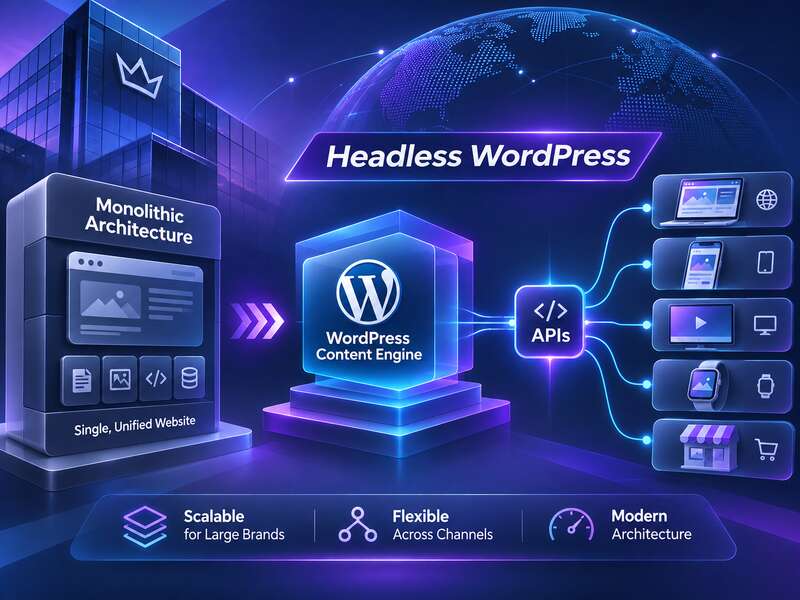
In the classic WordPress setup, WordPress stores content, renders pages, and serves the administrative area. In a decoupled or headless model, these roles are separated. WordPress remains the content source and editorial back office, while page rendering is handled by a separate application.
In practice, this does not always mean fully dismantling themes and templates. Often, businesses end up with a hybrid setup: part of the site remains standard, while individual areas — a catalog, personal account, search, interactive services — get an API-driven frontend. This kind of separation usually carries less risk than a complete headless relaunch of the entire site.
When headless really makes sense
The strongest argument for headless is not abstract “modernity,” but a specific content and channel structure.
- One CMS for multiple platforms. If content needs to be published not only on the website, but also in a mobile app, on microsites, in internal portals, or in other digital products, a separate content delivery layer can simplify the architecture.
- A complex interactive interface. If the frontend must work like a client-side JavaScript application with a lot of dynamic behavior, an API-first approach fits the task naturally.
- Gradual migration. When a business cannot rebuild the entire site at once, it is possible to move only part of the functionality into headless logic without breaking editorial workflows or rewriting everything in a single release.
- A centralized content hub. The official WordPress white paper describes an enterprise content hub as an architectural scenario in which one content center supplies data to multiple digital properties. This is not a universal recommendation for everyone, but it is a perfectly real model for companies with many channels.
In these scenarios, headless is not a decorative choice. It helps separate responsibility between the editorial layer and the presentation layer. For large teams, that can be convenient if processes have already moved beyond a standard WordPress theme.
When not to rush into headless
- There's no team to maintain two separate systems.
- The site relies on plugins that build the front end.
- The main goal is just a "more modern" look.
- The budget covers launch only, not ongoing work.
When it is better not to rush
There is a temptation to present headless as the “right” path for any business that wants an upgrade. But for many projects, it will be unnecessary complexity.
If a site is mostly made up of static pages, news posts, simple forms, and standard content types, classic WordPress is often cheaper and more reliable. In that case, a business pays not only for a new frontend, but also for a separate set of tasks: data synchronization, caching, access control, API testing, analytics, and maintaining two stacks instead of one.
In other words, headless should be treated as an architectural decision, not as an automatic improvement. It can be appropriate when there is a clear reason to separate layers. Without that reason, the move often adds more cost than benefit.
REST API: what it actually gives you
The WordPress REST API is the official way to retrieve content and data in JSON format for external applications. The documentation describes it as a resource-oriented API with standard HTTP response codes, as well as built-in self-documentation through the index endpoint and OPTIONS requests. For a developer, this means a predictable integration surface rather than a set of hidden calls or unstable hacks.
That is exactly why the API is convenient as the foundation for a separate frontend. But for the same reason, its role should not be overestimated. The existence of the REST API does not mean that WordPress suddenly becomes an ideal building block for any architecture. You still need to think separately about the data model, authorization rules, caching, and behavior at the boundary between public and private data.
Another important detail: WordPress explicitly warns that the REST API should not be disabled, because admin functionality depends on it. So even in standard installations, the API is not “an extra option for headless” but part of the core ecosystem. This clearly shows the boundary: the API is the foundation for integrations, but not necessarily a replacement for the standard management interface.
Can you create a new admin area through the API?
Yes, WordPress documentation allows for a scenario in which the REST API is used to build a separate data interface or a new administrative experience. But here it is important not to confuse what is possible with what is typical.
The fact that the API allows an alternative interface does not mean WordPress recommends replacing wp-admin in most projects. On the contrary, the documentation sends a clear signal: WordPress already has a rich set of tools and interfaces, and the REST API is an option that not every site needs.
So the more accurate way to put it is this: the REST API makes it possible to build a separate admin shell if your product truly needs a different UX, a separate release cycle, or specialized internal workflows. But that is an entirely separate product, not a “lightweight replacement” for the standard admin area.
Application Passwords: what they are for, and what they are not for
When a business starts building integrations with the WordPress API, the question of authorization comes up. For this, WordPress has Application Passwords — a mechanism designed specifically for programmatic API access. It is important to say this plainly: they are not intended for interactive browser login and are not used to sign in to wp-admin through wp-login.php.
WordPress also notes that these passwords are typically used via HTTP Basic Authentication over HTTPS. That is convenient for service integrations, scripts, external applications, and automated processes. But it is not “just another login method for a manager.” If someone in a project tries to use Application Passwords as a replacement for normal admin access, the architecture is already moving in the wrong direction.
Another practical nuance: the availability of Application Passwords can be changed or disabled through the wp_is_application_passwords_available and wp_is_application_passwords_available_for_user filters. That means you should not assume they exist on every site without checking. They were introduced in WordPress 5.6, in December 2020, but on older or specially configured installations they may not be available in working order.
| What we compare | Standard WordPress | Headless / decoupled |
|---|---|---|
| Editorial layer | In the standard wp-admin | Remains in WordPress |
| Page rendering | WordPress themes and templates | Separate frontend application |
| Integrations | API as an additional layer | API as the primary exchange method |
| Maintenance complexity | Lower for typical sites | Higher because of a separate stack and processes |
REST API or GraphQL: how not to mix up the tools
For WordPress, the standard direction remains the REST API. But in headless scenarios, WPGraphQL is often mentioned as well. It is a separate open-source plugin that adds a GraphQL schema and API to WordPress and is explicitly positioned as a tool for headless WordPress.
Its advantage for a frontend team is usually more precise data selection and easier access to related entities. However, it is not part of WordPress core, but a third-party component. So the decision to use WPGraphQL should be made separately: you need to look at plugin compatibility, load, caching, security, and the expertise of the team that will maintain this layer.
Practically speaking, this means one simple thing: if you need a standard, predictable, and well-documented integration method, the REST API remains the baseline option. If, however, the frontend team has a complex data model and many relationships between entities, GraphQL may be more convenient, but it also adds another layer of responsibility.
How to make the decision without illusions
The right question is not “is it time for headless?” but “what is our use case?” For a business, it is useful to evaluate architecture through a few grounded criteria.
- How many channels consume the content? One website is one thing; a website, an app, and several public content delivery points are quite another.
- How interactive is the frontend? The more client-side logic you have, the more logical an API-first approach looks.
- Who will maintain the system? If there is only a small team without separate frontend and DevOps resources, full headless may turn out to be too expensive.
- What exactly needs to be separated? Sometimes it is enough to move just one module, not the entire site.
- Can the editorial workflow be preserved without retraining the team? If not, you need to count not only technical cost, but also operational cost.
This is where the mistake most often happens. A team sees an example of a modern site, but does not see the cost of that architecture in day-to-day work. Headless can simplify multichannel content delivery, but it can also make launching new pages harder, change publishing workflows, and require more control over every integration point.
For WordPress projects with moderate complexity, this is not necessarily the best path. But for companies where content already functions as a central asset and needs to live in multiple interfaces at once, a decoupled architecture can be a very pragmatic solution.
So the smartest approach is not to focus on the “headless” label, but on the data flow: where content comes from, where it is processed, who consumes it, and what happens if one of these layers changes. That is usually what shows whether you need a separate frontend, or whether WordPress can remain the most rational foundation for quite a while without unnecessary complications.
Read also: “The WooCommerce Ecosystem: How to Scale Online Commerce Without Losing Control”.
Frequently asked questions
What is headless WordPress?
A setup where WordPress remains the admin and content store, while a separate front end fetches data through an API and renders the pages.
When does headless really make sense?
When the same content is needed on several platforms — site, app, kiosks — or when there are special UI requirements and a team to maintain two systems.
Why not go headless without a reason?
It costs more to build and maintain, and some plugins and previews stop working out of the box. For most business sites classic WordPress is simpler and more effective.