
Contents
- 1What Checkout Blocks changes exactly
- 2Why compatibility depends on more than just the theme
- 3How WooCommerce determines that a gateway is compatible
- 4What the documentation requires for payment method integration
- 5Where the gap between classic and block checkout appears most often
- 6What to check before migrating to Checkout Blocks
- 7What a developer should do if the module is needed in block checkout
- 8When classic checkout is actually the better choice
- 9Frequently asked questions
The move to Checkout Blocks in WooCommerce is often seen as a purely visual update: a newer interface, easier editing, less manual work. But for payment modules, the issue is not style, it is compatibility. This is where unpleasant surprises most often appear: a gateway that worked without problems in classic checkout may not show up among the payment methods in block checkout, or it may start behaving differently than the store expects.
For an online store owner, this is not an abstract technical topic. If the required payment method does not appear on the checkout page, the customer effectively loses the ability to complete the purchase. For a developer, it is also a signal that the integration should be evaluated not only by whether the plugin exists, but by how it is connected to the Blocks mechanism.
Key takeaways
- Checkout Blocks is the new block-based checkout page.
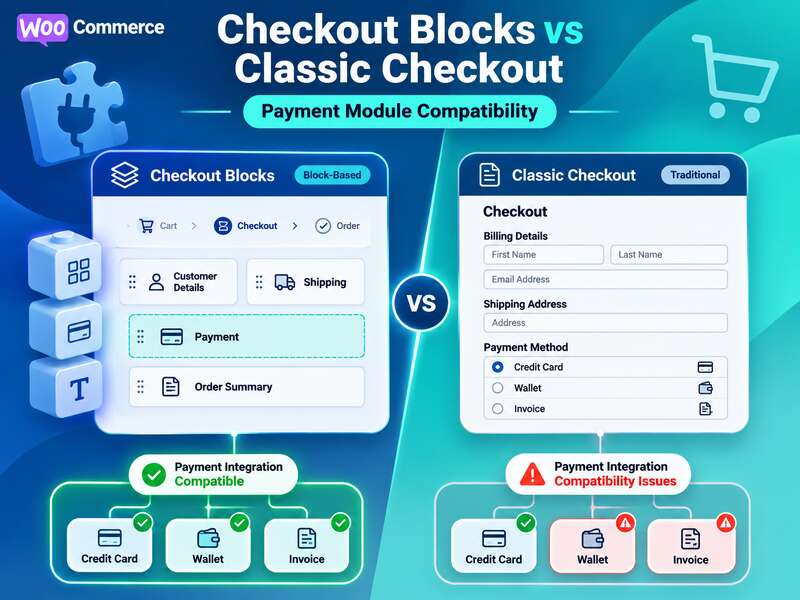
- A payment module must support blocks separately, or the method disappears.
- The classic checkout is still right when compatibility isn't confirmed.
What Checkout Blocks changes exactly
WooCommerce states this directly: if a payment gateway is not compatible with the block version of checkout, it may not be displayed as a payment option on the checkout page. This is the key difference from classic checkout, where many older solutions worked through the traditional set of templates and hooks.
In the block environment, WooCommerce may also show warnings about incompatible extensions and suggest switching to the classic checkout experience. This does not mean that any extension is automatically broken; rather, the system is signaling that the site’s current configuration includes components that are not yet ready for block checkout.
It is also worth mentioning the scenario where only incompatible payment gateways are active in the Checkout Block. In that case, the user may see a message such as “There are no payment methods available”. WooCommerce describes this as an expected situation for block checkout, not as a mysterious platform error. In practice, the checkout page simply cannot find a compatible way to complete payment.
Why compatibility depends on more than just the theme
The site theme affects the overall way the interface is edited, but it does not determine payment module compatibility on its own. WordPress describes block themes as themes built to edit all parts of a site through the Site Editor. Classic themes, by contrast, rely on PHP templates and do not work with the Site Editor in the same way as block themes.
This matters, but the levels of the problem should not be mixed up. Even if a site runs on a block theme, a payment plugin can still be incompatible with Checkout Blocks. And conversely, a classic theme is not an automatic obstacle to block checkout if the payment module itself is implemented correctly. In other words, “block theme” and “Checkout Blocks” are related, but they are not the same thing.
How WooCommerce determines that a gateway is compatible
According to the WooCommerce Blocks team’s explanation, payment gateway compatibility is checked by matching server-side registered gateways with front-end registered gateways. If a gateway exists only in the server-side list, it is not considered adapted for Cart/Checkout blocks.
This is a practical point that is often overlooked during audits. In the classic model, it is enough for the gateway to exist on the server and be able to process orders. In the block model, WooCommerce also expects proper front-end registration so that the payment method is available to the checkout interface.
That is why some modules can behave differently on the same site: they exist in the backend, but not in checkout. For the business, this looks like a mysterious disappearance of the payment option, although technically the reason is often quite clear: the extension has not completed the full integration path for Blocks.
What the documentation requires for payment method integration
WooCommerce documentation for checkout blocks describes payment method integration as a combination of client-side and server-side work. On the server, it specifies a class that extends Automattic\WooCommerce\Blocks\Payments\Integrations\AbstractPaymentMethodType
Here it is important not to oversimplify the picture into a single class or a single hook. A module may have its own architecture, but if it is meant to work in block checkout, it needs to pass the required data in a format that the Blocks front end can understand, while still preserving correct server-side payment processing.
The documentation also describes a scenario in which payment_data sent from the client is converted into $_POST, after which the payment gateway’s process_payment method is called. It is useful to read this as expected behavior within a properly integrated gateway, not as a universal rule for all possible WordPress plugins.
Where the gap between classic and block checkout appears most often
The easiest way to imagine the problem is this: classic checkout usually tolerates more legacy solutions, while Checkout Blocks requires a cleaner integration. That does not mean classic checkout is always “better.” But if you need quick stability without extra development, classic checkout as a fallback often turns out to be the safer option.
Block checkout, on the other hand, wins where the store is ready to invest in correct integration. The advantage is not only a more modern interface. For WooCommerce Blocks, it is also a controlled model of interaction between the client side, the server, and the payment method logic.
A separate risk is custom or rare payment modules. If there is no clear official mention of block support from the developer, it is safer to treat such a gateway as potentially incompatible until this has been verified in a staging environment. This approach is not pessimistic, but cautious: it saves time when, after an update, checkout suddenly loses part of its payment options.
Self-check before migrating
- Does every payment gateway declare Checkout Blocks support?
- Do shipping modules and custom fields work in blocks?
- Has a full test payment passed from cart to order status?
- Is there a quick way back to the classic checkout?
What to check before migrating to Checkout Blocks
For a store owner, the main question is not “Does this look modern?” A more important question is whether the customer sees all the required payment methods and can complete checkout without failures. Before launching block checkout, you should test each active gateway separately rather than rely on one “successful” payment.
- Check whether each payment module appears on the checkout page.
- Review whether the block editor shows warnings about incompatible extensions.
- Run through the full purchase flow: payment method selection, order confirmation, and the result message.
- Separately test what happens if only one or several gateways without block support are left active.
- In a staging environment, test the scenario where there are no compatible methods at all.
The last point is especially important, because that is where you will see whether the store is ready for fallback logic and whether it is clear to the user what is happening. If in such a configuration the checkout page shows a message about no available payment methods, that is no longer a minor technical detail but a business risk.
What a developer should do if the module is needed in block checkout
For the technical team, the minimum compatibility check is not just “is the plugin in the installed list.” You need to determine whether the server-side part of the integration is implemented, whether there is front-end registration of the payment method, and whether both sides are aligned according to the WooCommerce Blocks model.
If the integration is custom, it is better to think right away in terms of two levels: what checkout sees in the browser and what the server receives during payment processing. This is precisely where the errors that are not visible in the site administration area most often occur.
Another useful approach is to verify the module’s behavior not only in a successful payment scenario, but also in edge cases. For example, what happens if the payment method is available in the server logic but is not registered on the front end; or what checkout shows if only incompatible gateways are active. These checks filter out the false sense that “everything works,” which often appears after a superficial test.
When classic checkout is actually the better choice
Classic checkout should not be seen as an outdated backup plan for “old stores.” In certain configurations, it is simply the more rational choice at the current stage. If the store has important payment modules without confirmed Blocks support, moving to block checkout without a prior audit can create more problems than benefits.
In such a situation, classic checkout as a fallback helps preserve predictability. That does not mean giving up on updates forever. It does mean the transition can be planned in stages: first audit the critical gateways, then update the integrations, and only after that change the checkout model for the whole store.
This is the right way to think about payment module compatibility with Checkout Blocks: not as a cosmetic interface change, but as a check of the entire payment path — from displaying the payment option to correct server-side order processing. And if there is any doubt at any stage, it is better to catch it before release than to look for the reason for an empty checkout after the customer has already failed to pay.
Read also: “Why Thousands of Variations Slow Down WooCommerce and How to Rethink the Product Model” and “The WooCommerce Ecosystem: How to Scale Online Commerce Without Losing Control”.
Frequently asked questions
What are Checkout Blocks in WooCommerce?
It is the new block-based checkout page. It works differently from the classic shortcode, so payment modules must support it separately.
Why did a payment method disappear after switching to blocks?
Most likely the gateway has no Checkout Blocks integration, so WooCommerce doesn't show it in block checkout. Update the module or return to the classic checkout.
What should be checked before migrating?
Compatibility of every payment and shipping module, custom checkout fields and the full payment flow on a staging copy, from cart to order status.