
Contents
In WooCommerce, variation scale is not just “a lot of options in the product page.” When one product contains dozens, hundreds, or thousands of combinations, the very nature of catalog work changes: the longer a product takes to edit, the harder it becomes to maintain prices, stock, shipping, and attribute compatibility; the more complex the matrix, the greater the chance of errors in both the admin area and the frontend.
The official WooCommerce documentation explicitly describes a variable product as a product in which each variation can have its own price, stock, image, SKU, and other settings. In other words, one product page effectively contains many separate sets of data that need to be stored, processed, and kept in sync.
Key takeaways
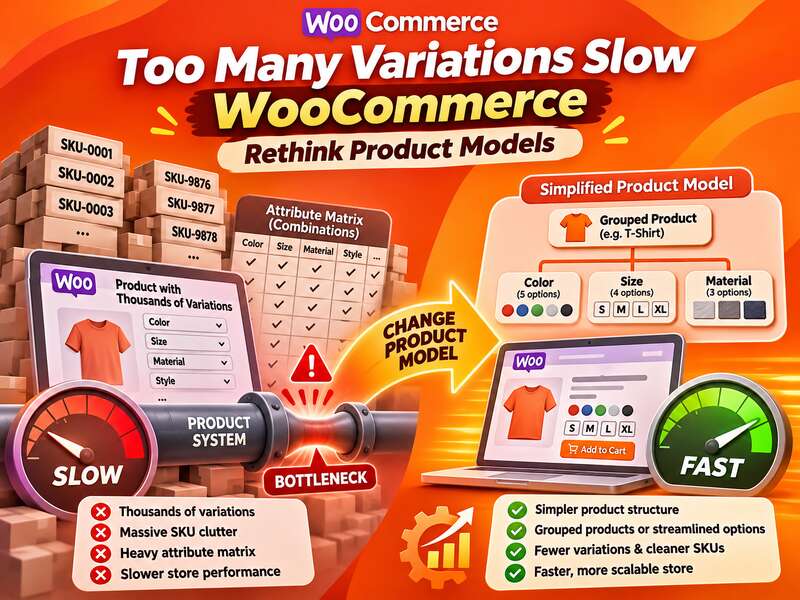
- Each variation is a separate record with prices, stock and metadata.
- Thousands of variations load the editor, filters and indexing.
- Sometimes changing the product model beats adding server power.
Where complexity starts to grow
The first pressure point is the product editor. WooCommerce notes that the price for each variation is set separately in the Variations section. The same applies to other parameters tied to a specific combination. When there are only a few variations, this is convenient. But when there are hundreds, catalog management scales almost linearly: every change has to be checked individually.
The second pressure point is frontend behavior. WooCommerce documentation clearly describes a threshold: for variable products with 30 or fewer variations, the selectors work dynamically, and after 30 WooCommerce switches the dropdowns into static mode. It is important not to read this as a universal “platform limit.” This is primarily documented interface behavior intended to reduce expensive recalculations of compatible combinations, and it does not mean that every store with 31+ variations will automatically become slow.
The third pressure point is operational risk. WooCommerce separately warns that with a large number of variations, incorrect sorting and the use of the Any {attribute}… option can create confusion in stock, pricing, shipping, and other variation data. This is not a guarantee of failure, but it is a clear reminder that a model with a large combination matrix requires discipline in setup.
Why “more variations” means more work than just for the theme
The problem is not limited to JavaScript on the product page. It also affects the backend: metadata saving, attribute indexing, admin lists, filtering, and compatibility with extensions. That is why, on large catalogs, not only the product page can feel sluggish, but also the editing of the product itself or the updating of related data.
The WooCommerce Developer Blog describes optimization of the product attributes lookup table as a response to the need to improve search and filtering for variable products, including scenarios with out-of-stock variations. In the same article, the team announced that the optimization was being prepared for beta testing in WooCommerce 9.1 beta, scheduled for June 25, 2024. The post explains why WooCommerce optimized search and filtering. It does not mean that a large number of variations is what slows down every store.
In other words, WooCommerce itself shows that lookup tables and related mechanisms are needed to support complex catalogs. But this does not lead to a simple formula of “the more variations, the worse it always is.” The real picture depends on data structure, indexes, hosting, caching, theme, and third-party plugins.
Signs you have too many variations
- The product editor takes tens of seconds to open.
- Most combinations share a price and have no separate stock.
- Catalog filters are noticeably slow.
- Imports and price updates take hours.
When a variation-based model starts to lose value
Most often, the problem is not the idea of variations itself, but the poor scaling of that idea. If the buyer sees one product with dozens of combinatorial options while the support team checks stock, price, shipping, and promotional rules every day, the product page stops being a “convenient abstraction” and turns into a complex database.
There is another practical signal: if the variations are actually separate SKUs, but the customer does not need to see them as one matrix, it is often better to split the model. This is not a dogma and not an automatic rule, but an architectural decision. Still, it reduces friction between UX and backend.
| Model | When it fits | What it complicates |
|---|---|---|
| Variations in a single product | When the combinations truly belong to one product and the user expects to choose within a single product page | Editing, indexing, stock control, risk of ambiguous combinations |
| Separate simple products | When each SKU has its own demand, its own stock logic, or a different commercial context | Requires more careful navigation, filters, or grouping |
| Grouped products | When products are related thematically but do not need a single variation matrix | Requires thoughtful UX so the customer does not get lost between items |
Note: the choice between variations, simple products, and grouped products does not have a universal “best” option. It depends on business logic, UX, the stock model, and the results of profiling the specific site.
What can be changed without a radical migration
If variations are necessary, start not with catalog migration, but with diagnostics. It is useful to measure where the delay occurs: in the get_available_variations() call, in postmeta queries, in the JavaScript handling of the variation selector, or in the impact of third-party plugins on the product page. WooCommerce’s performance best practices emphasize precisely the need to measure and benchmark changes rather than rely on intuition.
In practice, this means a few steps.
- Reduce the number of ambiguous combinations where you have to rely on Any {attribute}….
- Check whether all attributes really need to be variations rather than just filters or product characteristics.
- Move part of the SKUs into separate products if they differ not only in attribute values but also in sales logic.
- Do not mix in one matrix what customers perceive as different products.
When variations are needed, but indexing becomes the bottleneck
There are also tool-specific scenarios that clearly illustrate the limits of scaling. The WooCommerce Product Search documentation describes deferred indexing for variations: if the number of variations exceeds a certain threshold, part of the indexing is deferred to background processing. By default, that threshold is 3, and the authors recommend keeping the standard value to preserve the balance between product editing and background indexing. The same documentation notes that increasing the threshold runs into PHP memory and execution time limits.
This is important precisely as an example of an extension’s behavior, not as a description of the entire WooCommerce ecosystem. But the example is telling: once there are many variations, any indexing mechanism begins to require a compromise between editing convenience and the cost of processing data.
That is why a sensible approach to model migration usually looks like this: profile first, then simplify the matrix, then check whether it would be better to move part of the assortment into separate products or another navigation structure. If there are truly many products, sometimes the winner is not a more complex matrix, but a simpler catalog architecture.
When combinations start to behave as if they have a life of their own, it is worth bringing the model back to what it is actually supposed to do: help sales, rather than turn the product page into a node with too many dependencies.
If your catalog is already slow, start with profiling as part of speed optimization: it shows whether variations are the cause or queries, caching or hosting.
Read also: “HPOS in WooCommerce: How to Safely Move to Separate Order Tables”.
Frequently asked questions
Why do thousands of variations slow WooCommerce down?
Each variation is a separate record with prices, stock and metadata, which loads the product editor, product page, filters and indexing.
When should the product model change?
When most combinations have no separate price or stock. Some attributes can become product options, or the product can be split into several.
What can be improved without migrating the catalog?
Remove unnecessary combinations, load variations via AJAX, optimize filters and caching, and review heavy plugins.