
Contents
- 1Why integrations matter for business
- 2What WordPress can do in the context of integrations
- 3WooCommerce as the core of e-commerce
- 4Which systems can be connected to WordPress
- 5SalesDrive: when it is a good fit
- 6Ontraport: when automation of communications and workflows is needed
- 7What a healthy integration architecture looks like
- 8What to pay attention to before starting
- 9When a ready-made solution is enough and when custom development is needed
- 10Practical checklist before launch
- 11Frequently asked questions
A modern WordPress site is no longer limited to a contact form and a “Thank you for your order” page. For businesses that handle inquiries, sales, and inventory, the site becomes the entry point into the entire chain of processes: from lead to payment, from order to shipment, from status change to follow-up communication with the customer. That is why integrations with CRM, ERP, and inventory systems today are not a technical bonus, but one of the most useful ways to eliminate manual work and reduce errors.
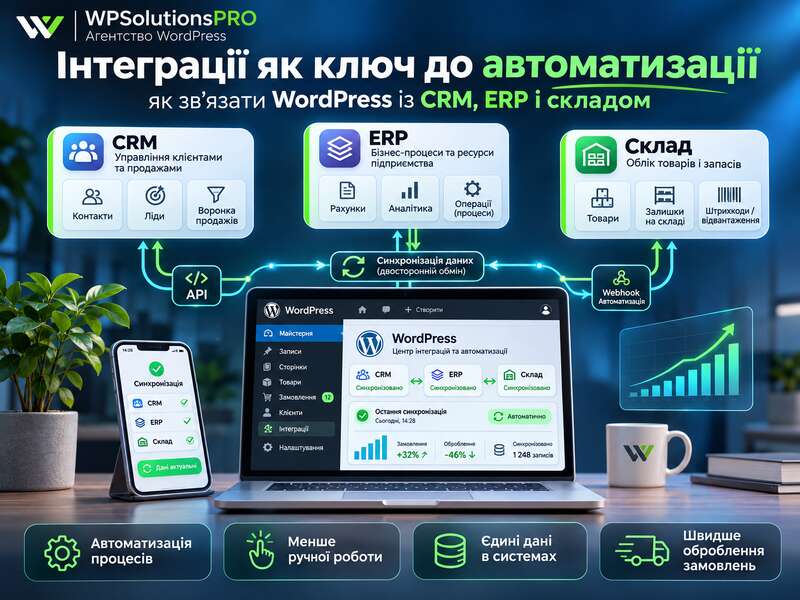
WordPress and WooCommerce provide a solid foundation for this. The WordPress REST API works with JSON and allows data to be both retrieved and sent, while WooCommerce uses REST API and webhooks to exchange products, orders, statuses, and other events. In practice, this means that the site can be not just “connected” to an external system, but turned into a near real-time data stream between all key company services.
Key takeaways
- Integrating with a CRM, ERP and warehouse removes manual work and errors.
- The base is the WordPress REST API and WooCommerce.
- Start with the business scenario, not with picking a plugin.
Why integrations matter for business
When a site operates separately from the CRM and inventory system, the team often ends up in a mode of manual data transfer: a manager copies a lead into the CRM, the warehouse separately checks stock levels, a marketer manually verifies the lead source, and order statuses are updated with a delay. This is not just inconvenient — it creates data gaps.
Integration solves several tasks at once:
- a lead or order is automatically sent to the CRM;
- status changes on the site are synchronized with the accounting system;
- product stock levels can be pulled from the warehouse;
- UTM tags and traffic source are not lost;
- managers get fewer routine tasks;
- the risk of duplication and human error is reduced.
But one important detail: integration is not just about “connecting the API.” You need to clearly define which data goes where, which system is the source of truth for each field, how errors are handled, and what happens if one system is temporarily unavailable.
What WordPress can do in the context of integrations
The foundation for most scenarios is the WordPress REST API. It works via HTTP requests and exchanges data in JSON format. This is convenient because external systems can read and write information in a standard way, without nonstandard workarounds.
At the same time, WordPress clearly separates public and protected data. Public posts may be available without authorization, while private data, custom post types, and meta fields require authentication or special access logic. For business use, this is a plus: there is no need to expose unnecessary data if the integration only needs specific entities.
For scenarios where the site sends data outward itself, authentication mechanisms are important. The WordPress documentation mentions cookie auth for requests originating inside WordPress and Basic Auth for HTTPS scenarios. There is also nonce protection against CSRF. This means that integration security should be built not only on “closing CORS,” but on the right combination of permissions, tokens, nonce, and account policy.
In practical business terms, this means: if the integration creates critical records — for example, an order or a status change — it should not be set up as a random “one-click plugin.” Access control, activity logging, and a clear understanding of which endpoints are used are required.
WooCommerce as the core of e-commerce
If the site sells products or services through WooCommerce, integration possibilities become even broader. WooCommerce is integrated into the WordPress REST API, and the current integration API version is v3. Working with it requires up-to-date WordPress and WooCommerce versions, as well as properly configured pretty permalinks. This is important: if the site uses Plain permalink structure, the REST API may work unreliably or not as expected at all.
Another practical detail is that WooCommerce API keys are usually tied to a WordPress user. In other words, access cannot be handed out carelessly: you need to create a separate technical account and manage permissions through it. This is a good approach for an agency or development team maintaining a client’s site.
Webhooks deserve special mention. They are what make the integration event-driven: for example, when a new order is created, WooCommerce can send data to a specified URL of an external system. This is much more convenient than constantly polling the site for changes. As a result, the CRM or ERP receives the event almost immediately after it occurs.
However, a webhook does not guarantee absolute reliability. Events may fail to be delivered because of a temporary issue on the receiver’s side, the network, or the site itself. That is why critical processes benefit from a fallback mechanism: periodic API checks, retry sending, or a task queue. This is already an architecture issue, not just a plugin configuration task.
Which systems can be connected to WordPress
In practice, WordPress most often acts as the central point, while external systems receive or send data according to their own logic. The most common connections are:
- WordPress ↔ CRM — lead processing, inquiries, repeat sales, and communication;
- WordPress ↔ ERP — exchange of orders, statuses, financial, or logistics data;
- WordPress ↔ inventory system — stock levels, reservations, SKUs, product variations;
- WordPress ↔ analytics and marketing — inquiry sources, UTM, attribution;
- WordPress ↔ delivery or payment services — status updates, payment confirmations, task creation for a manager.
The best integration is the one that solves a specific business scenario, not one that just “synchronizes something.”
SalesDrive: when it is a good fit
SalesDrive is well suited for online stores and e-commerce workflows where inquiries, products, inventory, statuses, and order processing logic matter. According to the service documentation, it supports API, webhooks, and integration with WordPress. It includes inquiries, products, categories, exchange rates, payment methods, shipping methods, statuses, payments, and inquiry status change events.
For a business, this means the integration can cover not only the fact that an order was created, but a much broader set of scenarios: product transfer, variation handling, status synchronization, and UTM tag transfer. The last point is especially important if the company spends money on advertising and wants to see where sales are really coming from.
It is practically useful to plan for the following scenarios:
- a customer submitted a request on the site;
- the data was automatically created in SalesDrive;
- the manager changed the request status;
- the status was sent back to the site or to another connected service;
- product, SKU, or variation data was updated without manual copying.
But there is an important nuance here: a “ready-made integration” does not always mean no customization is needed. In practice, you often need field mapping, duplicate-customer rules, handling for mismatches in product or variation names, and sometimes separate logic for partial shipments.
Ontraport: when automation of communications and workflows is needed
Ontraport is a different type of system. From an integration perspective, it is more like a platform for marketing automation, contacts, and business workflows than a classic e-commerce CRM. Requests require an API key + App ID pair, and webhooks, live API documentation, and sandbox accounts for testing are also available.
This is very useful for an agency because it allows development and production environments to be separated. You should not use the same set of keys for both testing and the live site: it is better to plan a separate integration environment from the outset. This makes it easier to track errors, avoid accidental duplicate records, and not break the client’s real processes during debugging.
Ontraport is appropriate if your site is tied not only to sales, but also to longer workflows: lead segmentation, trigger emails, automated funnels, post-sale actions, and complex communication chains. In that case, WordPress can send events, and Ontraport can trigger the next automation steps.
What a healthy integration architecture looks like
To make an integration stable, do not start with the technical implementation. First, you need to describe the business process. It is better to think not in terms of “plugin/not plugin,” but in terms of events and system responsibilities.
A basic flow may look like this:
- WordPress collects initial data from a form or checkout;
- WooCommerce records products, payment, shipping, and status;
- the CRM receives the lead or order;
- the ERP or inventory system confirms stock, reservation, and shipment;
- the status is sent back to WordPress if needed for the customer account or manager dashboard.
Before launch, it is worth defining separately what the source of truth is for each type of data:
- contact details — CRM or site;
- price — site, ERP, or price integration;
- stock — warehouse or ERP;
- order status — CRM, warehouse, or WooCommerce;
- lead source — the site with UTM tracking or the CRM.
Without this step, the integration quickly turns into chaos, where every system lives by its own rules.
What to define before integrating
- Which system is the source of truth for products, stock and customers.
- Which fields are sent and in which direction.
- How often data syncs.
- What happens when a data exchange fails.
What to pay attention to before starting
There are several technical and organizational nuances that are better addressed before the project begins.
1. Check the site structure
For WooCommerce, pretty permalinks are critically important. If they are not configured, the REST API may work incorrectly. This is one of those small details that are easy to miss at the start, but they can derail the entire integration scenario.
2. Prepare accounts and access
Do not mix development, testing, and production access. Separate keys, separate roles, and separate accounts help manage integrations more safely and identify the source of problems faster.
3. Plan error handling
What should happen if the CRM does not respond? Should the request be retried? Should there be an error log? Should the administrator be notified? These questions are better resolved at the design stage.
4. Define rules for inventory conflicts
If the same product changes on the site and in the inventory system, conflicts are inevitable. You need to decide who updates the SKU, how variations are handled, what happens with reservations, and how partial shipments are processed.
5. Do not ignore data quality
Integration does not fix poor reference data. If the catalog contains duplicates, incorrect SKUs, or inconsistent variation names, automation will only spread the error across all systems faster.
When a ready-made solution is enough and when custom development is needed
A ready-made plugin or standard integration is suitable when you have a simple scenario: one form, one CRM, standard fields, and minimal exceptions. But if the business has multiple data sources, different product types, complex statuses, multiple warehouses, or an unusual sales model, custom development is usually unavoidable.
A custom approach is needed when:
- the system must transfer not only the order but also context;
- complex field mapping logic is required;
- there are several data flows with different rules;
- version control, logging, and fallback synchronization are needed;
- it is important to integrate WordPress not with one system, but with an entire chain of services.
For an agency, the key role here is not just to “connect the API,” but to design the data architecture. That is what separates a one-time technical setup from working business automation.
Practical checklist before launch
- Define the main business scenario for the integration.
- Specify which fields are transferred between systems.
- Assign the source of truth for prices, stock, and statuses.
- Check permalinks, access, and API keys.
- Set up webhooks for events where speed matters.
- Add an API fallback for critical processes.
- Plan error logging and retries.
- Check whether UTM and product variations are processed correctly.
- Test the integration in a sandbox or test environment.
- Only then launch the live setup.
Integrating WordPress with CRM, ERP, and inventory systems is not about “another technical module,” but about order in the data and control over business processes. If everything is configured properly, the site stops being an isolated showcase and becomes part of a single operational flow: it receives a request, passes it on, updates statuses, preserves the traffic source, and does not force managers to copy data manually.
SalesDrive is a good option where e-commerce, inquiries, inventory, and statuses matter. Ontraport is suitable for scenarios that require automated communication, marketing logic, and well-structured API interaction through separate keys and a sandbox. In any case, the best result comes not from the mere fact of integration, but from proper design: what data goes where and when, what to do in case of an error, and how to prevent duplication.
From a business perspective, the right integration saves team time, reduces human error, and helps scale without chaos. From a development perspective, it requires discipline: clear architecture, security, testing, and a fallback scenario. That is exactly where professional implementation creates value.
Frequently asked questions
Can WordPress be integrated with a CRM and ERP?
Yes. The WordPress REST API and WooCommerce make it possible to sync inquiries, orders, customers and stock with a CRM, ERP and warehouse.
Where should an integration start?
With the business scenario: what is sent, when and in which direction, which system is the source of truth and what happens on errors. Implementation comes next.
Ready-made plugin or custom integration?
A ready-made solution fits standard scenarios. Custom fields, complex status logic or high reliability requirements call for a custom integration.