
Contents
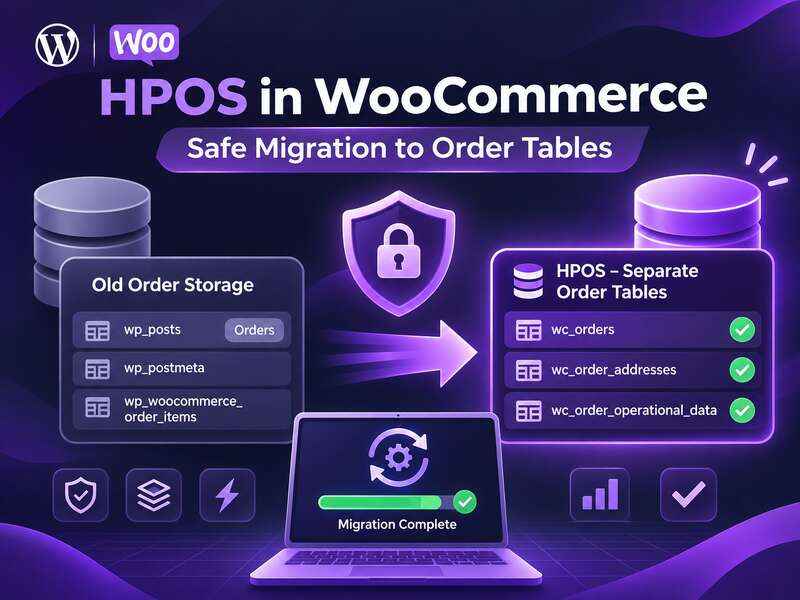
HPOS in WooCommerce is not just a technical switch — it changes the storage model for orders itself. If, in the past, the business logic of many stores in one way or another relied on wp_posts and wp_postmeta, then with High-Performance Order Storage orders live in separate tables. For a developer, this means less dependence on the post type. For a store owner, it means a different approach to migration, compatibility checks, and rollback.
WooCommerce’s official documentation describes a safe migration path quite clearly: before making HPOS the primary storage, you need to enable compatibility mode, wait for the data to synchronize, verify critical scenarios, and only then switch the authoritative storage. This sequence is what reduces the risk of losing orders or ending up with discrepancies between the old and new storage.
Key takeaways
- HPOS stores orders in dedicated tables and speeds up order handling.
- The main risk is custom code that touches orders directly.
- Switch via compatibility mode and staging tests.
What HPOS Actually Changes
In WooCommerce documentation, HPOS is described as a separate layer for storing order data. Instead of distributing everything across the universal post tables, the system uses four main tables: wc_orders, wc_order_addresses, wc_order_operational_data, and wc_orders_meta. This matters not only as an architectural fact, but also as a practical signal: the project now has a separate “contour” for order-related data, and that needs to be respected in the theme, plugins, and custom code.
What does this approach give you? WooCommerce links HPOS to the goal of simplifying storage, improving scalability and reliability, and reducing the number of read and write operations compared to the custom post type model. But this should not be read as a universal promise of speed improvements. The real effect depends on the theme, plugins, metadata volume, SQL indexes, and even the hosting infrastructure.
Where to Start a Safe Migration
For a small store, the temptation is strong: just turn on the new option and see what happens. But for a production site, that is a bad strategy. For larger stores, WooCommerce recommends a different order of operations: first test the migration on a local copy and in a staging environment, then enable synchronization on production, wait for the data to be verified, and only after that make HPOS the authoritative storage.
This approach sounds cautious, and that is exactly right. The complexity is not in the switch itself, but in the fact that orders are not just database records. They live in payments, refunds, statuses, webhooks, emails, ERP/CRM integrations, fulfillment, analytics, and reporting. If even one of these links depends on direct access to wp_posts or wp_postmeta, the migration may expose a hidden dependency.
Practical Workflow
- Create a local or staging copy with the same set of plugins, hooks, and customizations as production.
- Enable compatibility mode so that the old and new storage remain synchronized in parallel.
- Run backfill and wait for the background migration to complete.
- Test payment, refund, status change, email/webhook delivery, and integrations.
- Check whether there are any discrepancies in reporting and order queries.
- Only then switch the authoritative tables.
That is the sequence that keeps the migration manageable. If you skip the verification steps, you will not get a quick rollout — you will get technical debt in the most sensitive part of the store.
What Compatibility Mode Means in Practice
Compatibility mode is your safeguard during the transition. In this mode, WooCommerce maintains two-way synchronization between the authoritative storage and the backup one. In other words, records need to stay aligned in both the old and the new model. This allows you to test HPOS without immediately breaking away from the current production process.
At the same time, there is an important limitation: WooCommerce does not allow you to switch the authoritative tables if there are still orders in the queue that have not been synchronized. This is critical for planning the maintenance window. If you are hoping to squeeze the migration in between two sales peaks, keep in mind that the queue may not empty as quickly as you would like. For larger stores, the time depends on the order volume and server load.
From a business perspective, this is not a drawback but a safeguard. While compatibility mode is enabled, you have room for control, verification, and a fast rollback without losing current orders. But that is exactly why you should not delay testing: long-term operation in dual synchronization is not a final state, but a temporary bridge.
Where Problems Most Often Hide
The riskiest area is custom code. WooCommerce explicitly notes that the CRUD API usually allows support for both the posts side and custom tables without extra work. But that is only true for code that uses supported APIs. If the project contains direct SQL queries to the posts or meta tables, they need to be reviewed separately.
Here the key rule is: CRUD compatibility does not remove the need to check whether HPOS is enabled if you write SQL or non-standard logic. That is why, before migration, the developer should go through the theme, plugins, and custom modules not only as functionality, but also as a source of technical assumptions.
What to Check in the Code
- direct access to
wp_postsandwp_postmetafor orders; - custom reports built with SQL without the WooCommerce API;
- webhook handlers that read orders directly from the database;
- CRM/ERP integrations that expect the old structure;
- shipping, payment, and refund plugins that may have their own data queries.
A good practice is not only to look for direct SQL operations, but also to check how the business logic is built. For example, if a plugin expects an order status or metadata to have a certain access path, it may appear to work correctly while producing inconsistent results during migration or afterward.
When to Use WP-CLI
For stores with a large volume of orders, manual work through the admin area often becomes inconvenient. WooCommerce provides commands under the wp wc hpos namespace for synchronization, verification, and HPOS maintenance, including migration between storage systems and cleanup of redundant data. This is a convenient path if you need better visibility into progress and more control over operations.
CLI should not be seen as a “magic safety mode.” Its advantage is controllability, not automatic errorlessness. Before running it, you need to check the current synchronization status, prepare backups, and work in an environment where you can roll back without pain. For production, this is especially important if integrations, order imports, or unstable external webhooks are running at the same time.
Put simply, WP-CLI is useful not because it “makes everything faster,” but because it brings discipline. In complex stores, discipline is often more important than the speed of clicks in the admin panel.
Before switching to HPOS
- All plugins are marked HPOS-compatible.
- Custom code uses the WooCommerce CRUD API.
- A test on a copy with real orders has passed.
- There's a fresh database backup and a rollback plan.
How to Build Testing Before Production
The best testing scenario is not an abstract empty copy of the site, but a staging environment with the same stack. That means identical themes, plugins, custom hooks, payment gateways, shipping rules, status mapping, and any external integrations. Only in such an environment can you see whether HPOS holds up not just at the CRUD level, but across the entire chain of store behavior.
Pay especially close attention to:
- creation of new orders and their appearance in the correct storage;
- status changes after payment, cancellation, or manual processing;
- refund scenarios and partial refunds;
- emails to the customer and the administrator;
- webhooks and event delivery to external systems;
- admin lists, filters, reports, and custom screen queries.
If the store has complex fulfillment rules, it is worth checking separately the cases where an order is put on hold, partially fulfilled, or updated through a third-party service. These are the situations that most often reveal whether you really have no hidden dependency on the old structure.
What to Do About Rollback
One reason to keep compatibility mode active until testing is complete is the ability to quickly return to posts storage if something goes wrong. WooCommerce describes rollback as a relatively quick scenario if synchronization is already in place and the data has not diverged. But this should not be confused with a guarantee of a painless return in every situation.
In practice, rollback is not a “Plan B instead of testing,” but the last safety net. If you have not verified your order-processing chains, rollback may only undo the symptoms, not the cause. So the correct logic is: first staging, then synchronization, then verification, and only then a decision about authoritative storage.
Does HPOS Mean the Old Approaches No Longer Work?
No, but they are no longer universally safe. If your code is built on the WooCommerce CRUD API, in many cases it may work with both the old and new storage without extra changes. Problems arise where development has used direct access to the post structure as an “internal API.” Those are the solutions that create the greatest resistance during the transition.
That is why HPOS is also a useful audit. It forces you to answer honestly: is the extension really built as a WooCommerce integration, or does it merely happen to work with the current database schema? For projects that have accumulated technical patches over the years, such a review can be no less valuable than the move to the new tables itself.
If you look at migration pragmatically, HPOS should not be sold to yourself as an “upgrade for the sake of upgrading.” It is a tool that helps align the order architecture with modern WooCommerce requirements. But its success is determined not by the feature name in the settings, but by the quality of preparation: testing, code compatibility, and discipline during the transition.
That is why the smartest strategy for a store is to treat HPOS as a separate release with a full verification cycle, not as a quick toggle. Then the new tables will work not as a surprise for the team, but as a controlled stage in the evolution of the order infrastructure.
Frequently asked questions
What is HPOS in WooCommerce?
High-Performance Order Storage keeps orders in dedicated tables instead of generic WordPress posts, which speeds up order handling in large stores.
How do I switch to HPOS safely?
Check plugin and custom code compatibility, enable compatibility mode, test on a staging copy with real data, and only then switch production.
Can I roll back after switching?
Yes, as long as compatibility mode is on and data syncs to both storages. Keep it enabled until testing is complete.