
Contents
- 1What accessibility means on the web in simple terms
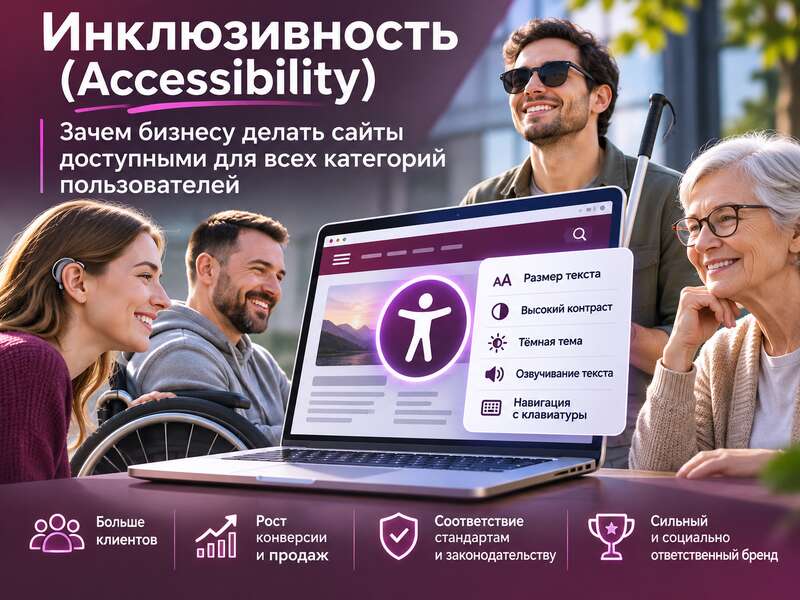
- 2Why it benefits business
- 3What WebAIM research shows
- 4Why “modern HTML” does not automatically mean an accessible site
- 5Where to start if you need to improve a WordPress site
- 6Are automated checks enough
- 7What to build into the process now
- 8Frequently asked questions
When businesses talk about website accessibility, it often sounds like something done “for the checklist” or as a narrow topic for a specific group of users. In reality, accessibility is about whether a person can actually use your website without unnecessary obstacles: read the text, navigate with a keyboard, fill out a form, find a product, complete a purchase, or book a service.
Inclusivity matters not only for people with permanent disabilities. It also helps those with temporary limitations, older audiences, users with poor internet connections, small screens, or simply tired and distracted people. From a business perspective, that means fewer barriers on the path to an inquiry or order.
Key takeaways
- Accessibility means every visitor can use the site.
- Barriers in forms and text directly cost the business customers.
- Automated scanners find only part of the problems.
What accessibility means on the web in simple terms
Accessibility is a set of principles and practices that make a digital product understandable and convenient for a wider range of people. This is not just about design, but also about code semantics, page structure, content text, the behavior of interactive elements, and the quality of form errors.
The benchmark in this area is WCAG — the Web Content Accessibility Guidelines. WCAG 2.2 became an official W3C recommendation on October 5, 2023, and expanded the requirements compared with WCAG 2.1 by adding nine new success criteria. It is also important that WCAG 2.x is a stable technical standard that can be relied on in development, audits, and procurement.
In other words, accessibility is not an abstract idea. It is a set of concrete rules: whether keyboard focus is visible, whether fields have labels, whether error messages are clear, whether the site can be used without a mouse, and whether the meaning of the content gets lost in complex layouts.
Why it benefits business
The first and most obvious reason is that you do not lose people because of basic barriers. If a form cannot be completed with a keyboard, if a button looks like plain text without semantics, if a modal window cannot be closed with the keyboard, part of your audience will simply leave. And this is not necessarily someone with a diagnosed disability.
The second reason is UX quality. Many accessibility practices automatically make a site better for everyone: clear headings, logical structure, high-contrast text, labeled buttons, short and precise form errors, predictable navigation. What helps a screen reader user is often just as convenient for anyone who is in a hurry or browsing on a phone.
The third reason is legal risk. For companies operating in the EU, accessibility has long since stopped being just a “best practice.” EU Directive 2019/882, known as the European Accessibility Act, sets minimum accessibility requirements for certain products and services. For some services, the information must not be more complex than CEFR level B2, which means the language of the content becomes subject to requirements as well, not just the code.
The fourth reason is reputation and scalability. If a site is built accessibly from the start, it is easier to grow it without constantly patching small but critical problems. This is especially noticeable on large commercial projects with catalogs, filters, checkout flows, popups, forms, and separate integrations.
What WebAIM research shows
The annual WebAIM Million analysis clearly illustrates that this is a widespread problem. In 2024, the average homepage had 56.8 accessibility errors. That does not mean that all pages are equally poor, but it does show the scale: accessibility errors are not the exception, they are the norm.
Another important signal is that websites are becoming more complex. On average, a homepage contained 1,173 elements, which is more than the previous year. The more elements and interactions there are, the higher the chance that something will break: a label will be missing, headings will be nested incorrectly, the DOM will be overloaded, or the keyboard navigation scenario will conflict with something else.
It is especially telling that only 13.3% of homepages had a skip link. This is a very simple tool that allows keyboard users to quickly jump to the main content, bypassing menus and utility blocks. Even worse, about one in ten skip links was broken. Such a small detail can seriously affect the user experience, even though it is easy to implement and verify.
WebAIM reports also show that commercially complex categories such as shopping, style & fashion, real estate, and sports have more errors than government websites. That is logical: the more integrations, banners, promotional blocks, and complex interactions there are, the harder it is to maintain quality. But that is exactly why businesses should not wait until a site “grows” into a critical point.
Why “modern HTML” does not automatically mean an accessible site
One common myth is that if a site is built on a modern stack or has a valid HTML5 doctype, then accessibility must be fine. In practice, that is not the case. WebAIM notes that pages with a valid HTML5 doctype did not necessarily have fewer problems; on the contrary, they could have both more elements and more errors.
The point is simple: a correct doctype declaration does not guarantee that the page is semantically structured properly. You can have a “clean” document with a poor heading hierarchy, unclear buttons, missing field labels, or modal windows that do not work with a keyboard.
Likewise, ARIA is not a universal answer. It is often used as a patch for everything, although excessive or incorrect use of ARIA is linked to more errors. The practical rule here is simple: start with semantic HTML, and use ARIA only where it is truly needed and appropriate.
Basic accessibility check
- Can the site be used with a keyboard only?
- Do all images have meaningful alt text?
- Do form fields have labels and errors have text explanations?
- Is the text easy to read against its background?
Where to start if you need to improve a WordPress site
You do not necessarily need a full redesign right away. For most business websites, it is more sensible to start with the basics that deliver the biggest impact:
- check the contrast of text and interface elements;
- review the heading structure on key pages;
- add a visible keyboard focus state;
- write meaningful alt text where images convey information;
- label all form fields and make errors clear;
- add a skip link for main navigation;
- replace div-based button and link imitations with real semantic elements.
For WordPress, it is especially important to look not only at the theme but also at plugins. Page builders, sliders, popups, forms, filters, and e-commerce modules are often what create barriers. A theme may be relatively clean, but a single heavy plugin can break keyboard navigation or make the page inconvenient for a screen reader.
That is why you should test not “the site as a whole,” but the key user flows: the homepage, catalog, product page, checkout, contact form, search, blog post, modal windows, and mobile menu. These are usually where the problems appear that directly affect conversion.
Are automated checks enough
No. Automated scanners are useful, but they only catch part of the issues. They can find a missing alt attribute, low contrast, or structural errors, but they do not always assess whether a message is phrased clearly, whether the tab order is logical, or whether an action can be completed without a mouse.
A practical approach is to combine several types of checks. Start with an automated audit, then manually test keyboard navigation, then test with a screen reader, and separately check modal windows, menus, forms, checkout, and mobile scenarios. If a user zooms the page or opens the site on a narrow screen, problems often become even more visible.
Form error messages deserve especially close attention. If a message like “Invalid input” does not explain what exactly needs to be fixed, that is poor UX even without formal violations. And if information in the EU must be understandable and not overloaded with complex language, then the quality of microcopy is no longer cosmetic — it becomes part of compliance.
What to build into the process now
The best approach is to make accessibility part of the process rather than a separate firefighting stage right before launch. Requirements should be documented in the specification and checked in design, development, content, and QA. If you wait until release, fixes are usually more expensive and more painful.
From a practical standpoint, it is useful to have a short checklist for every update:
- does the site work with a keyboard without traps;
- is there a clear heading structure;
- is focus visible on all interactive elements;
- do forms have labels, hints, and error messages;
- do new plugins and widgets not break accessibility;
- have the key templates passed manual testing.
If your site sells, generates leads, or serves an international audience, accessibility is not an extra bonus. It is a way to make the product clearer, more stable, and less risky. And in most cases, those are exactly the things that separate a website that merely exists from one that people can truly use comfortably.
An accessibility check pairs well with a technical website audit: both show where visitors stumble before they ever send an inquiry.
Read also: “Color Psychology in E-Commerce: How Visual Choices Guide Customer Behavior”.
Frequently asked questions
What is website accessibility?
It is a set of principles that make a site usable by everyone, including people with visual, hearing or motor impairments. The main standard is WCAG.
Why is accessibility good for business?
You stop losing customers to basic barriers like a form that can't be completed or unreadable text. An accessible site is also easier for everyone and clearer to search engines.
Is automated testing enough?
No. Scanners catch only part of the issues, so manual checks are needed: keyboard navigation, screen reader use and clear forms.