
Contents
- 1After launch, it is not “minor maintenance” — it is operational work
- 2Why updates are not a formality
- 3Automatic updates are useful, but they are not magic
- 4Without backups, “quick recovery” is only a promise
- 5Security does not end with a strong password
- 6The support process matters more than one-off fixes
- 7What should be planned before launch
- 8Frequently asked questions
Building a website means getting it into a working state. But from a business perspective, that is not the finish line — it is the start of operations. It is only after launch that issues become visible that are hard to spot during development: plugin conflicts, the consequences of updates, non-obvious security problems, dependence on hosting, and the human support process.
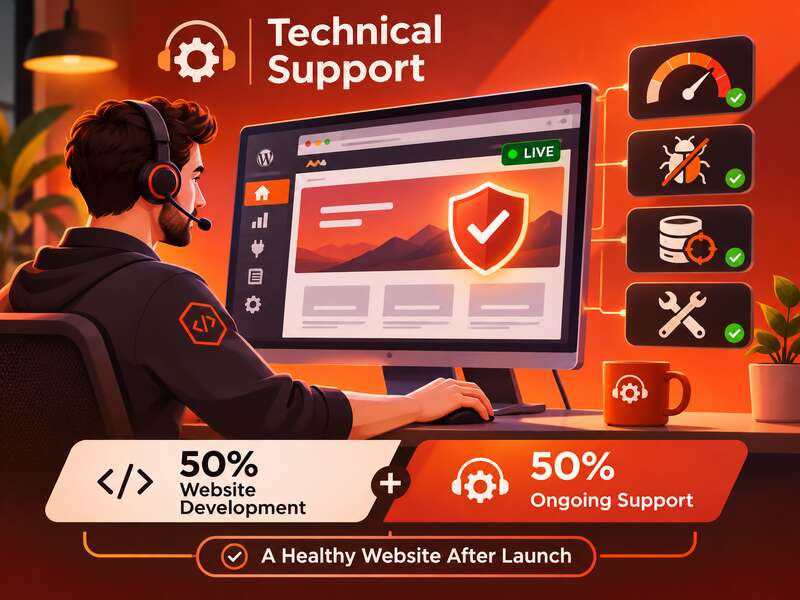
That is why the idea that website development is only 50% of success describes the reality of WordPress projects well. This is not an exact mathematical formula, but a practical view: half of the value is created during launch, and the other half during day-to-day maintenance. Without it, a site may formally exist, but it will gradually lose stability, responsiveness, and manageability.
Key takeaways
- Regular operational work starts after launch.
- Updates, backups and monitoring prevent most problems.
- Plan support before the project is handed over.
After launch, it is not “minor maintenance” — it is operational work
WordPress itself is not a static product. The core, plugins, and themes change, and with them the behavior of the site changes as well. The official WordPress documentation recommends keeping the site updated to the latest version. For WordPress 3.7+, minor and security updates can be installed automatically in the background, while major feature releases usually require manual confirmation.
This is an important point: automation does not remove responsibility. It only reduces routine work. If a site has custom modifications, a complex set of plugins, or specific hosting settings, even a routine update may require compatibility checks. Otherwise, the site starts accumulating technical debt: invisible at first, but expensive to fix later.
Why updates are not a formality
WordPress.org emphasizes that only the latest major version of WordPress is officially supported. Older major branches may receive security fixes only at the discretion of the Security Team and without a guaranteed timeline. For business, this means one simple thing: reliable support cannot be built around an outdated version as if it were a “normal” state.
There is another risk: updating the core overwrites core files. Any changes made inside the core will be lost. That is why WordPress architecture has a strong recommendation: do not edit the core, and move all custom functionality into plugins, mu-plugins, or a child theme. This is not just a developer formality — it is a way to preserve functionality after future updates.
In practical terms, this looks like the following: if a business process, form, calculator, or custom logic is hardcoded directly into system files, any update becomes a risk. If, however, it is placed in a separate code layer, a core update will not destroy the custom work. This is where support starts affecting the total cost of ownership at least as much as development does.
Automatic updates are useful, but they are not magic
By default, WordPress runs automatic updates for plugins and themes twice a day. This is convenient, but it does not mean everything should be updated without control. Automatic updates reduce routine work, but they do not verify business logic, compatibility, or third-party integrations for you.
It is useful to distinguish three levels:
- core — requires regular version control and a predictable update scenario;
- plugins — can affect forms, payments, SEO, security, and authentication;
- theme — can change templates, layout, blocks, and part of the display logic.
If a site is commercial, auto-updates should be treated as a tool, not a strategy. For some projects, it makes sense to keep automation for minor/security updates, while major updates should be done after testing in a staging environment. This is especially important when the site includes payment modules, multilingual functionality, CRM integrations, or complex frontend customization.
Without backups, “quick recovery” is only a promise
Backups are one of the few things that directly turn a failure from a catastrophe into a manageable incident. The WordPress documentation explicitly states that with a proper backup of the database and files, a site can be quickly restored after a failure, and that backups of the site and database are considered essential.
But it is not only the existence of a backup that matters — it is the tested recovery process. A backup that has never been tested may turn out to be incomplete, outdated, or unusable for quick deployment. In support practice, this means you need to define in advance:
- where backups are stored;
- how often they are created;
- who has access to them;
- what the site recovery procedure is;
- what counts as a successful rollback.
For business, what matters is not the abstract “presence of a backup,” but the actual time needed to return to a working state. That is why, in a proper support model, backups always go together with a recovery procedure rather than existing separately from it.
Security does not end with a strong password
WordPress hardening guidance explicitly warns that older versions of WordPress do not receive security updates, and that official releases should be downloaded only from wordpress.org. This is basic, but critical. It reminds us that site security is not a one-time configuration — it is an ongoing state of attention to updates and the source of the code.
In support, security should not be a separate “checklist item” but part of the operational process. This includes updates, access control, plugin compatibility checks, backups, and incident response. If a site has elevated risk, it makes sense to consider network-level protection mechanisms as well. For example, OWASP, in its recommendations on WAFs, describes them as an additional protective layer that helps filter suspicious traffic and reduce the impact of some attacks. But a WAF is not a substitute for updates or sound architecture — it is only one element of protection.
In other words, good website protection consists of several layers. If one of them is weak, all the others work worse. That is why support cannot be reduced to “check whether the site opens.”
The support process matters more than one-off fixes
The WordPress Support Handbook treats support as a separate practice, not a one-time service. And that is a very accurate reflection of reality: support is not a one-off repair, but a regular discipline. Without it, a site quickly turns into a collection of random decisions that nobody maintains systematically.
For a business owner, it is more useful to think not “we need a developer in case something breaks,” but “we need a clear support process.” In a good support model, at least the following should be defined:
- how often core, theme, and plugin updates are checked;
- the rules for testing before major updates;
- the backup schedule;
- the recovery procedure after a failure;
- the response time for incidents;
- who decides to postpone an update if there is a risk of breaking an important function.
Without these agreements, support becomes chaotic: something is updated, something is not checked, something is not saved, something is rolled back manually. That is expensive, slow, and stressful.
Minimum support for a business site
- Updates with a backup before and a check after.
- Daily copies stored off the server.
- Uptime monitoring with alerts.
- A clear response time for emergencies.
What should be planned before launch
The best time to think about support is before the site is handed over. This is not only a technical decision, but also a commercial one. If a project is delivered without a maintenance plan, the owner is almost guaranteed to face a situation where every small change becomes an individual risk.
The developer should document not only the functionality, but also how it is maintained: where the custom code lives, how updates are performed, what needs to be checked after an update, and what the recovery procedure looks like. For business, it is useful to require transparency on these points already at the launch stage. This makes it possible not just to “have a website,” but to manage it.
In short, development creates the ability to work online, while technical support keeps that ability operational. And that is why the success of a WordPress project is rarely determined only by the quality of the initial build. It is determined by how well the site is prepared to live after launch — with updates, backups, checks, and disciplined maintenance.
Frequently asked questions
Why is technical support needed after launch?
WordPress keeps changing, and new vulnerabilities and plugin changes appear. Without support the site gradually becomes slower and more vulnerable.
Can I rely on automatic updates?
Partly. Auto-updates cover small patches, but updates can break compatibility, so you need a backup before and a check afterwards.
What should be planned for support before launch?
Access, documentation, an update schedule, backups, monitoring and a clear process for who responds to which requests and how quickly.