Manage WooCommerce Store Opening Hours Automatically
WPSolutions – Store Open Hours is a lightweight WooCommerce plugin that lets store owners define business hours and automatically prevent customers from placing orders when the store is closed.
The plugin is designed for restaurants, delivery services, local shops, service businesses and any WooCommerce store that accepts orders only during specific hours. Instead of manually enabling and disabling checkout every day, you configure the weekly schedule once and the plugin handles the rest automatically.
What the Plugin Does
Store Open Hours checks the current WordPress date, time and timezone against the schedule configured in the plugin settings.
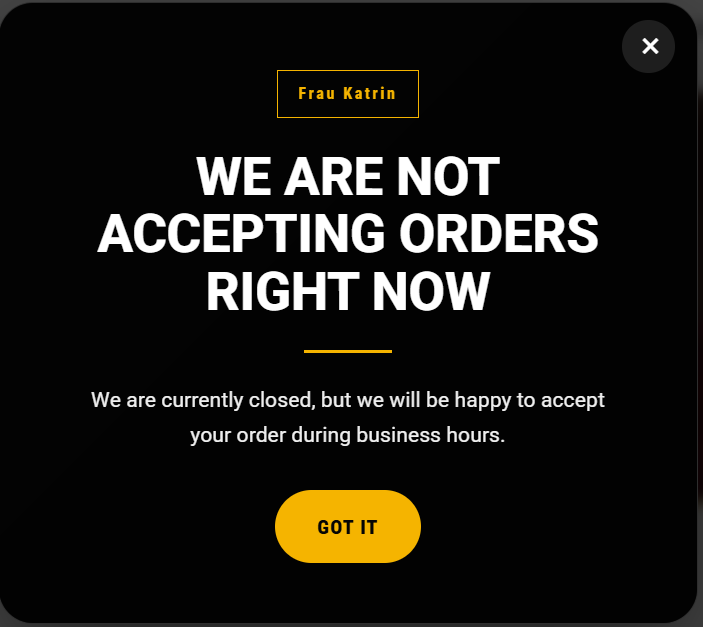
When the store is open, WooCommerce works normally. When the store is closed, the plugin can display an informational popup and block checkout so customers cannot submit an order outside your business hours.
This keeps the customer experience clear and prevents orders from being created at times when your team cannot process them.
Main Features
- Weekly opening-hours schedule — configure working days and opening/closing times separately for every day of the week.
- Automatic open/closed detection — no daily manual action is required.
- WooCommerce checkout blocking — prevents order submission while the store is closed.
- Cart checkout protection — the normal checkout action is disabled outside business hours.
- Off-hours popup — clearly informs visitors that ordering is currently unavailable.
- Custom popup content — edit the badge, title, message and close-button text.
- Custom checkout messages — control the text shown when checkout is unavailable.
- Custom popup design — select a background image, text color, accent color, overlay color and overlay opacity.
- Popup repeat interval — choose how often the closed-store popup may be shown again to the same visitor.
- WordPress timezone support — calculations use the timezone configured in WordPress settings.
- Overnight working hours — schedules such as 18:00–02:00 are supported correctly.
- Multilingual administration interface — the plugin interface follows the WordPress admin language when a translation is available.
- Lightweight implementation — no external services, accounts or APIs are required.
How It Works
After installation, open the Store Open Hours settings page under WooCommerce. Enable the plugin and configure the working schedule for each day.
For example, you can configure Monday through Friday from 10:00 to 22:00, Saturday from 11:00 to 23:00 and disable ordering entirely on Sunday.
The plugin compares the current local WordPress time with this schedule automatically.
During opening hours, customers browse the store and complete checkout as usual. Outside opening hours, the plugin switches WooCommerce into its closed state. The checkout controls become unavailable, a custom message is displayed, and the optional popup explains that ordering is not currently possible.
Designed for Real Store Schedules
The schedule logic also supports businesses that work past midnight.
If your store opens at 18:00 and closes at 02:00, the plugin correctly understands that the schedule continues into the following calendar day.
The plugin uses the timezone selected in Settings → General in WordPress, so you do not need to calculate server time or UTC offsets manually.
Customizable Customer Experience
The closed-store popup can be adapted to match the website design.
Administrators can change its background image, text and accent colors, overlay color and opacity, as well as all important customer-facing messages.
The popup also includes a configurable repeat interval. This prevents the same visitor from seeing the message on every page load while still allowing the store to remind returning visitors that ordering is unavailable.
Checkout Protection
Hiding a button visually is not enough for an e-commerce website.
Store Open Hours also validates the store status during WooCommerce checkout processing. If a customer reaches checkout while the store is closed, the plugin prevents the order from being submitted and displays the configured closed-store message.
This provides an additional server-side protection layer instead of relying only on frontend JavaScript.
Multilingual Admin Interface
The administration interface is prepared for WordPress localization and follows the language configured for the WordPress dashboard.
Translation files can be included with the plugin, while customer-facing texts remain editable by the store administrator.
This means the interface can be translated without forcing a particular language on the storefront messages. Store owners remain free to write popup and checkout texts in the language that best fits their customers.
Who Is It For?
Store Open Hours is useful for any WooCommerce business that should accept orders only at certain times, including restaurants and food delivery websites, cafés and bakeries, local grocery or retail stores, flower and gift delivery businesses, same-day delivery services, businesses with staff-dependent order processing and stores that close on specific weekdays.
Simple Setup
- Install and activate WPSolutions – Store Open Hours.
- Open the plugin settings under WooCommerce.
- Enable the plugin.
- Select active working days and configure opening and closing times.
- Customize the popup and checkout messages.
- Optionally select a popup background image and colors.
- Save the settings.
The configured schedule is then applied automatically.
Built for WooCommerce
The plugin integrates directly with standard WooCommerce cart and checkout hooks and does not require a third-party SaaS platform.
It is intentionally focused on one task: reliably controlling whether orders can be placed according to the store’s business hours.
Developed by WPSolutionsPRO
WPSolutions – Store Open Hours was created by WPSolutionsPRO as a practical WooCommerce solution for stores that need predictable ordering hours without complicated scheduling systems or unnecessary functionality.